Kids Bowl Free
- 4.2
- Rating
- 500.00K
- Installs
- Free
- Price

 Analysis by App-foxy
When I first opened Kids Bowl Free, I understood its purpose almost immediately: it is a practical entertainment app for people who already use the Kids Bowl Free program and want their bowling coupons available while away from a computer. I would not describe it as a game, a bowling simulator, or a discovery platform. Its value is much narrower and, for the right family, much more useful: it puts access to a coupon-based bowling benefit in a phone-friendly place.
That narrow focus also makes the app easier to judge honestly. I am not looking for elaborate entertainment features here. I am asking whether it helps a parent get from “we planned to bowl” to “we can show the offer at the center” with less hassle. In my experience, that is the standard that matters. The app is free, aimed at Everyone, and belongs in the entertainment category, but its practical role feels closer to a digital pass holder than to a conventional entertainment app.
What the app is really for
The developer is Steven Grimm, and the app has been available since February 9, 2018. Its current version is 2.5.3, with Android 7.0 or later required. Those details matter because this is the sort of utility families may install on an older spare phone or a parent’s everyday device. The operating-system requirement is not especially demanding, although anyone using a very old Android phone should check compatibility before planning a trip around it.
You May Also Like

 Blood Strike: 2.5 Anniversary
Blood Strike’s Loadouts Turn Every Drop Into a Tactical Gamble
A close look at Blood Strike’s custom loadouts: how fast access to signature weapons reshapes its battle royale rhythm, rewards preparation, and narrows the gap between fights.

 Pandora - Music & Podcasts
Pandora’s Music Is Easy to Start, but Harder to Recover
Pandora’s strength is its low-effort path from a seed to a station. Its weak spot is how much confidence it asks you to place in connection, setup, and quiet recovery.

 8 Ball Pool
 Is Built on Rivalries, Rematches, and Routine
A close look at the rivalries, rematches, shared routines, and unanswered safety questions that turn a quick pool match into a persistent mobile community.

 Samsung Music
’s Quiet Strength Is Playing What You Already Own
Its reach comes less from spectacle than from dependable access to a personal library. That simplicity is both the app’s strongest retention engine and its ceiling.

 AccuWeather: Weather Radar
AccuWeather Review: A Quick, Clear Forecast for Everyday Decisions
For everyday plans, the best forecast is the one you can understand quickly. AccuWeather makes rain timing, radar, and local conditions easy to act on, with a few trade-offs.

 Hill Climb Racing
Why Hill Climb Racing Still Turns Crashes Into One More Run
A tiny car, a bumpy hill and one more upgrade: Hill Climb Racing keeps resurfacing because its simple chaos makes every near-miss feel personal.
More From Our News Desk



The audience is quite specific. If your family already participates in Kids Bowl Free, this app can make the coupon part of the experience more convenient. If you are simply looking for bowling games, local entertainment ideas, or a way to book lanes, you are likely to find it too limited. I would also skip it if you expect a broad account dashboard, social features, or a full replacement for every step involved in visiting a bowling center.
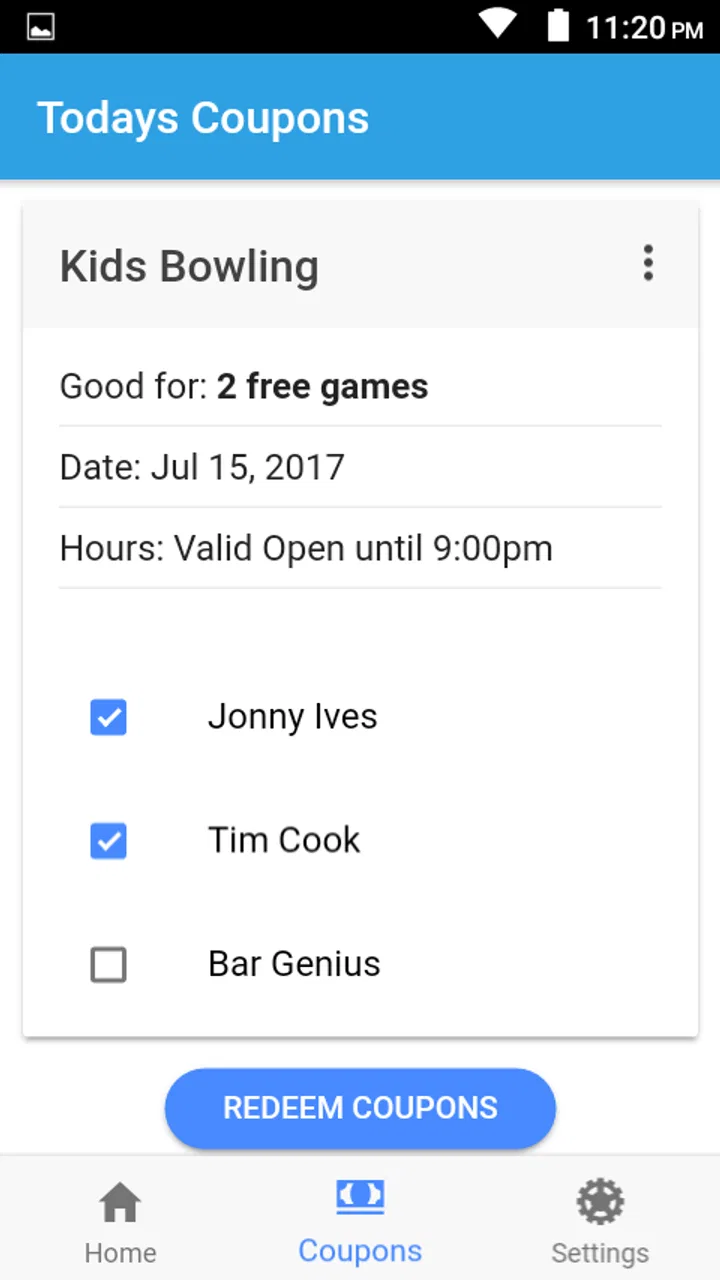
The app’s strongest quality is that it does not need to pretend to be more than it is. A parent may install it before leaving home, sign in or access the relevant program area, and then keep the phone ready for the visit. That workflow is more sensible than searching through email, browser tabs, screenshots, or a printed page while children are waiting at the counter.
Why trust matters for a coupon app
Coupon apps naturally create a trust question. A user may be asked to interact with an account, open an offer, or display information at a public counter. That means the important issue is not just whether the interface looks pleasant. It is whether the app gives me a clear enough path to the benefit I came for, without making me guess what is happening at each stage.
I treat the app’s established presence as a modest reassurance rather than proof of perfection. It has passed the half-million-install mark and holds an average rating of 4.2 from roughly 700 ratings, alongside more than 300 written reviews. Those figures suggest that many people have found it useful, but they do not remove the need to check the offer details and account behavior for yourself.
My practical advice is to install it before the day of your bowling trip, not in the parking lot. That gives you time to see how access works, confirm that your account is usable, and understand what appears on screen. A coupon app is most valuable when it removes uncertainty at the venue; last-minute setup can create the opposite experience.
Controls and visible choices
One thing I look for in an app like this is a clear separation between accessing a benefit and doing anything unrelated to that benefit. The useful user choice should be obvious: open the program area, retrieve the coupon information, and present it when needed. If a screen asks for an action that does not seem connected to bowling access, I would pause rather than tap through automatically.
I also prefer using the app in a deliberate sequence. I open it before leaving, review the relevant offer, and avoid closing the session until I know what I need to show. At the bowling center, I keep the brightness high enough for the staff to read the screen and avoid relying on a photograph unless the program specifically allows that method. A live coupon view and a screenshot are not always treated the same way, so the safer habit is to use the app’s own display whenever possible.
The free price is helpful because it removes one common source of hesitation. I can try it without paying for another subscription or committing to a premium tier. Still, “free” should not be confused with “effortless.” The real cost is attention: keeping the app updated, remembering account details, and checking whether the displayed offer applies to the visit I am planning.
There is also an important distinction between the app and the bowling center. The app can help present the coupon, but it does not turn every center visit into an automatic booking or guarantee that a particular time, lane, or local condition will be available. I would still check the center’s own requirements before setting out, especially for busy periods, special events, or questions about who qualifies.
Account moments deserve extra care
Any time an app involves an account, I slow down. I use an email address I can access, choose a password that I do not reuse elsewhere, and avoid saving credentials on a shared phone. That advice is especially relevant for families: children may use the device, but the parent should remain the person who controls the account and decides what information is entered.
I would not create multiple accounts simply because different family members use different phones. That can make it harder to remember which account contains the relevant program information. A single, carefully managed account is usually easier to maintain, provided it matches the program’s own rules. If another parent needs access, I would share the appropriate login method only with that trusted person rather than leaving the phone permanently unlocked.
Another useful habit is reviewing the screen before showing it to staff. I want to know whether I am displaying the actual coupon, a profile page, an expired offer, or a general program message. This small check prevents an awkward conversation at the counter and helps me notice when an account needs attention before the family arrives.
I am cautious about making claims regarding permissions or data practices without a visible, current explanation inside the app or its official privacy materials. What I can say from a user perspective is that account-related screens deserve the same care as any other service that stores personal details. I would read the permission prompts as they appear, grant only what makes sense for the app’s stated function, and revisit device settings if I later decide I no longer want access enabled.
Data-sensitive situations in everyday use
The most data-sensitive moment is usually not the bowling game itself; it is setup. A parent may be entering an email address, signing into an account, or allowing the app to remain available on a phone that other family members use. I would complete that setup at home, on a private connection, rather than while distracted in a crowded lobby.
I also avoid taking unnecessary screenshots of coupon screens. Screenshots can remain in a photo library, cloud backup, or shared family album long after the visit. If the app provides a direct way to display the offer, that is the cleaner option. If I do need a screenshot for a temporary reason, I would delete it afterward and check the trash or recently deleted area as well.
Shared devices deserve a separate approach. On a family tablet, I would sign out when finished and avoid enabling automatic login if children or visitors can open the device. On my personal phone, I might accept the convenience of staying signed in, but only after checking the lock-screen and notification behavior. A coupon reminder that exposes account information in a notification preview is not ideal when the phone is visible to others.
These are not criticisms of a specific hidden practice. They are sensible boundaries for using any account-based coupon tool. The app’s purpose is simple, but simplicity does not mean a user should stop paying attention to where account information appears or how long a coupon image remains on a device.
Where it fits beside the usual alternatives
The usual alternative is a mobile browser. A parent can visit the program’s website, sign in, and show the relevant page. That route may be better for someone who wants to avoid installing another app or who uses several devices interchangeably. It can also be preferable when the browser offers clearer account-management controls or when the app is not compatible with an older phone.
The advantage of the dedicated app is convenience. An app icon is easier to find than a forgotten browser bookmark, and a focused interface can reduce the number of steps between opening the service and reaching the coupon area. For a family that bowls regularly, that small difference can matter. I would especially appreciate it when children are already putting on their shoes and I need the offer ready without searching through messages.
Email or printed coupons have a different strength: they can be easier to archive and share with another adult. They may also work better for someone who dislikes signing into apps at the venue. The trade-off is that email searches can be slow, while paper can be misplaced or damaged. I see Kids Bowl Free as the middle option: more immediate than paper and usually more focused than digging through an inbox, but still dependent on a working phone and usable account access.
A general rewards wallet may be a better choice for someone managing many unrelated memberships. It can keep passes together, but it may not understand the particular flow of this bowling program. I would choose the dedicated app when the family’s main goal is quick access to Kids Bowl Free coupons, not when the phone is already overloaded with loyalty cards and the browser is easier to manage.
A realistic family visit
Imagine a parent planning a Saturday afternoon at a participating bowling center. Before leaving, I would open the app, make sure the correct account is available, and check the coupon screen while I still have time to solve a login problem. I would also confirm the phone has enough battery and that the display is readable. Those preparations sound small, but they prevent the most common kind of friction: discovering at the counter that the needed screen is not the one currently open.
At the center, I would show the offer directly from the app and let the staff explain any local handling requirement. I would not assume that the app itself covers shoe rental, food, arcade play, reservations, or every member of the group. The coupon benefit and the rest of the outing are separate parts of the plan, so I would budget and prepare for them separately.
Afterward, I would close the app, delete any temporary screenshots, and sign out if the phone is shared. On the next visit, I would check the offer again instead of assuming that a previously viewed screen remains valid. This workflow gives the app a clear role without asking it to manage the entire family outing.
Who should use it, and who should pass
I recommend trying it if you are a parent or guardian who already intends to use Kids Bowl Free and wants the coupon available on a phone. It is also a reasonable fit for families that frequently misplace printed offers or dislike searching email at a busy venue. The free price makes experimentation easy, and the Everyone rating makes its intended audience straightforward.
I would be more cautious if you rarely bowl, do not want another account on your phone, or prefer handling every offer through a browser. In those cases, the app may add little. People with unreliable mobile access should also prepare a backup way to verify their eligibility or offer, because a phone-based workflow is less comfortable when connectivity, battery life, or screen access is uncertain.
It is not the right choice for someone expecting a complete bowling-center marketplace. It does not replace personal planning, local communication, or checking the conditions attached to a visit. Its usefulness depends on the specific Kids Bowl Free program, so installing it without intending to use that program would be unnecessary.
My cautious verdict
After looking at it as both a convenience tool and an account-based service, I see Kids Bowl Free as a focused coupon companion, not a full entertainment platform. That focus is its main strength. It gives families a dedicated place to prepare for a bowling visit instead of forcing them to manage the offer through scattered messages or paper.
The app’s limitations are equally clear. Its usefulness depends on having the right program access, a workable account, and a phone ready at the moment the coupon is needed. It does not remove the need to check local details, and it should not encourage users to ignore basic account and privacy habits. I would install it ahead of time, review every visible choice carefully, and keep a simple backup plan for the day of the visit.
For the intended family, that is enough to make the app worthwhile. The combination of a free download, a mature release history, and a focused purpose gives it a sensible place on a parent’s phone. My recommendation is conditional but positive: use it when Kids Bowl Free is already part of your plans, manage the account deliberately, and judge it by whether it gets the coupon in front of you with less fuss than your current alternative.
FAQs for Kids Bowl Free
01What is Kids Bowl Free and how does it work?
Kids Bowl Free is a program designed to provide children with free bowling opportunities during the summer. Upon registering, kids receive vouchers for two free games daily at participating bowling centers. The app allows parents to easily manage registrations, track available games, and find participating locations.
02Is the Kids Bowl Free program available on both Android and iOS devices?
Yes, the Kids Bowl Free app is available for download on both Android and iOS devices. This ensures that users can access program features, such as registration and voucher management, regardless of their smartphone platform. Links to download the app are provided on the Kids Bowl Free website.
03Are there any costs associated with using the Kids Bowl Free app?
While the app itself is free to download and use, some centers may charge for shoe rental or offer additional services at a cost. It’s advisable to check with individual bowling centers for any additional fees to ensure a smooth experience for you and your children.
04How can I find participating bowling centers using the Kids Bowl Free app?
The Kids Bowl Free app includes a convenient feature to locate participating bowling centers. By using the location services on your device or manually searching within the app, you can easily find nearby centers that honor the Kids Bowl Free vouchers, ensuring a hassle-free outing.
05Can family members other than children participate in the Kids Bowl Free program?
The Kids Bowl Free program primarily targets children, but parents and older siblings can purchase a Family Pass for a nominal fee. This pass allows them to join in the fun and bowl alongside their children, encouraging family bonding and making for an enjoyable group activity.
Pros
- Free bowling games for kids available.
- Easy to use interface for all ages.
- Promotes family-friendly activities.
- Encourages physical activity and fun.
- Available in various locations nationwide.
Cons
- Limited to participating bowling centers.
- May have seasonal availability.
- Requires registration for use.
- Not all features are free.
- Parental supervision may be needed.

Kids Bowl Free
Gallery